Leverage Withe's hiring event platform
Streamline your seasonal and high-volume hiring process and hit your hiring targets.
For career fair organizers, every question on a registration or feedback form is a trade. Each one costs a little completion, and each one can return something useful: a better match between candidates and employers, evidence for a funder, or a lesson for the next fair. A question that doesn't lead anywhere is just friction.
The forms are also where the funder report starts. Registration records who the fair reached, the employer form shows the hiring demand in the room, and feedback and follow-up show what changed for the people who came. Choose those questions with the report in mind, and every answer has somewhere to go.
This post walks through the five forms a career fair needs, in the order an organizer builds them, with a copy-and-paste template for each. It draws on Withe's Career Fairs That Make an Impact guide.
Leverage Withe's hiring event platform
Streamline your seasonal and high-volume hiring process and hit your hiring targets.
Which forms does a career fair need?
A career fair needs five forms: employer registration, job seeker registration, employer feedback, job seeker feedback, and a follow-up survey. Each covers a different stage of the fair and adds its own piece of the funder report.
| Form | Who fills it in | When it goes out | What it adds to the funder report |
|---|---|---|---|
| Employer registration | Employers | When employer registration opens, ideally 10+ weeks before the fair | Employer participation and hiring demand |
| Job seeker registration | Job seekers | Opens 4 to 8 weeks before the fair | Measure reach, the employment baseline, and registration sources |
| Employer feedback | Employers | Within 24 hours of the fair | Employer satisfaction and the employer outcome rate |
| Job seeker feedback | Job seekers | Within 24 hours of the fair | Candidate satisfaction and the candidate connection rate |
| Follow-up survey | Job seekers, plus one question for employers | 30 and 90 days after the fair | Interviews, offers, and hires |
Employer registration comes first because a strong employer lineup is what gets candidates to sign up.
What should the employer registration form ask?
The employer registration form confirms that each booth is worth a candidate's time, and its answers become the employer participation numbers in the funder report. Hiring goals separate employers who are hiring now from those attending for brand visibility, and "actively hiring" is the first sign of an employer worth prioritizing. Specific roles feed the event page, where real openings give candidates a reason to register. A day-of employer contact matters because the person who commits isn't always the person who shows up.
| Question | Answer format | What it feeds |
|---|---|---|
| Organization name | Text, required | Event page and booth list |
| Primary contact name and email | Text and email, required | Organizer communication |
Who will staff the booth on the day, and what is their phone number? | Text, required | Day-of contact |
| What best describes your booth? | Select: Hiring now, Hiring in the next 3 months, Brand awareness, Resource or service | Booth tags and employer participation |
| How many roles are you hiring for? | Number | Hiring demand |
| Which roles are you hiring for, and in which locations? | Long text | Event page and candidate matching |
| Link to your careers page | URL | Candidate follow-up |
| How many representatives will attend? | Number | Booth setup |
What do you need at the booth, and which candidates are you hoping to meet? | Long text, optional | Logistics and candidate outreach |
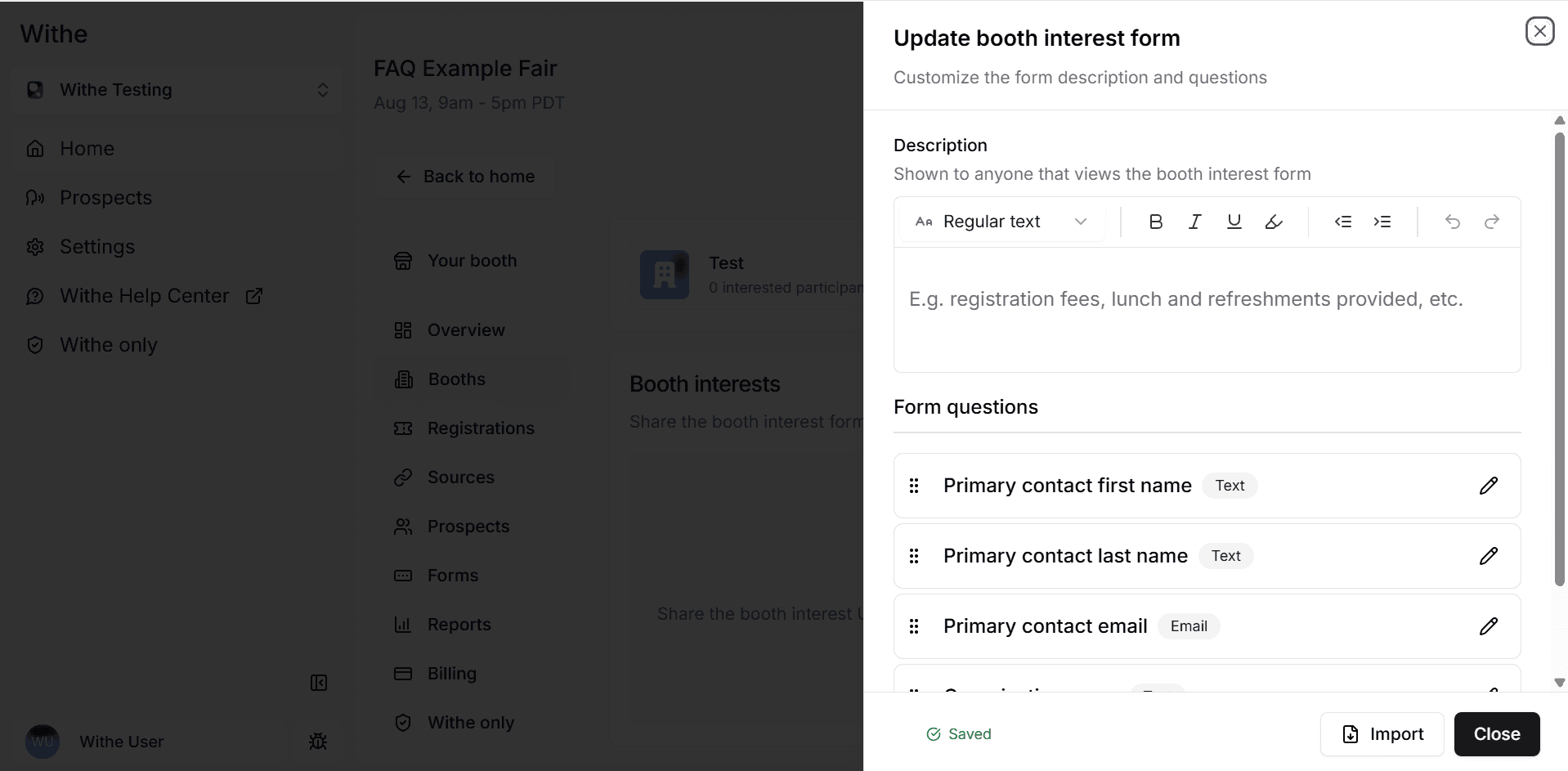
In Withe, the Booth interests form starts with the primary contact and organization fields, and organizers add the rest.
What should the job seeker registration form ask?
The job seeker registration form records who the fair reached, and it sets the baseline every outcome is measured against. Employment status asked here, then asked again in the follow-up survey, shows the change a funder is paying for. Industries of interest point candidates to the right booths, and "How did you hear about this fair?" backs up trackable marketing sources.
Keep the form short, because every extra field costs sign-ups. In NP Digital's December 2024 analysis of 404 landing pages, single-field forms converted at 18.2%, 4-field forms at 9.9%, and forms with 9 or more fields at 4.2% (NP Digital). One question worth its place is accessibility. In 2022, 27% of Canadians aged 15 and older had at least one disability (Statistics Canada), and more than 1 in 4 US adults reported one (CDC).
For demographic questions, copy the funder's categories exactly so the data rolls up without recoding. That might be the US standard, which the Office of Management and Budget revised in 2024 to a single combined race and ethnicity question (U.S. Census Bureau), or the four designated groups in Canada's Employment Equity Act (Government of Canada). Make those questions optional, and explain what is collected, who it is shared with, and why, as the consent guidelines from the Office of the Privacy Commissioner of Canada ask.
| Question | Answer format | What it feeds |
|---|---|---|
| First and last name | Text, required | Check-in and follow-up |
| Email, required | Reminders, feedback, and follow-up surveys | |
| Phone number | Phone, optional | Day-of updates |
| What is your current employment status? | Select, required: Employed full-time, Employed part-time, Unemployed and looking, Student, Other | Funder baseline |
| What is your experience level? | Select: Entry level, 1–3 years, 4–9 years, 10+ years | Employer matching |
| Which industries are you interested in? | Multi-select, matching the employer list | Booth matching and employer demand |
| Are you legally eligible to work in [country]? | Yes or No, with logic that stops ineligible registrations | Eligibility, only if the fair requires it |
| How did you hear about this fair? | Select: Partner organization, Email, Social media, An employer, Friend or family, Other | Source check |
| Do you need any accessibility accommodations to attend? | Long text, optional | Day-of planning |
| Upload your resume | File, optional for newcomers and students, required for sector-specific or professional fairs | Employer follow-up |
| Demographic questions your funder requires | The funder's exact categories, optional, with "Prefer not to say" | Funder report |
I agree that my registration details can be shared with employers I connect with at this fair. | Checkbox, required | Consent |
Withe handles accessibility requests automatically. Every registration includes a way to request an accommodation, at sign-up or any time after, and the organizer is notified when a request comes in. Each one appears in the Registrations list, where the organizer can accept it, deny it, or email the candidate to work out the details.
What should the employer feedback form ask?
The employer feedback form shows whether the fair delivered for the people doing the hiring, and an employer who would attend again is a likely referral for the next fair. Booth feedback forms work best short and fast. Send them within 24 hours, keep them to 5 questions or fewer, and put the rating first: SurveyMonkey found that surveys opening with a simple multiple-choice question averaged 89% completion, against 83% for those opening with a comment box (SurveyMonkey). Expect partial responses, since 10% to 20% is a good rate for conferences and corporate events, according to a 2021 benchmark (Explori), and report the respondent count next to every percentage.
| Question | Answer format | What it feeds |
|---|---|---|
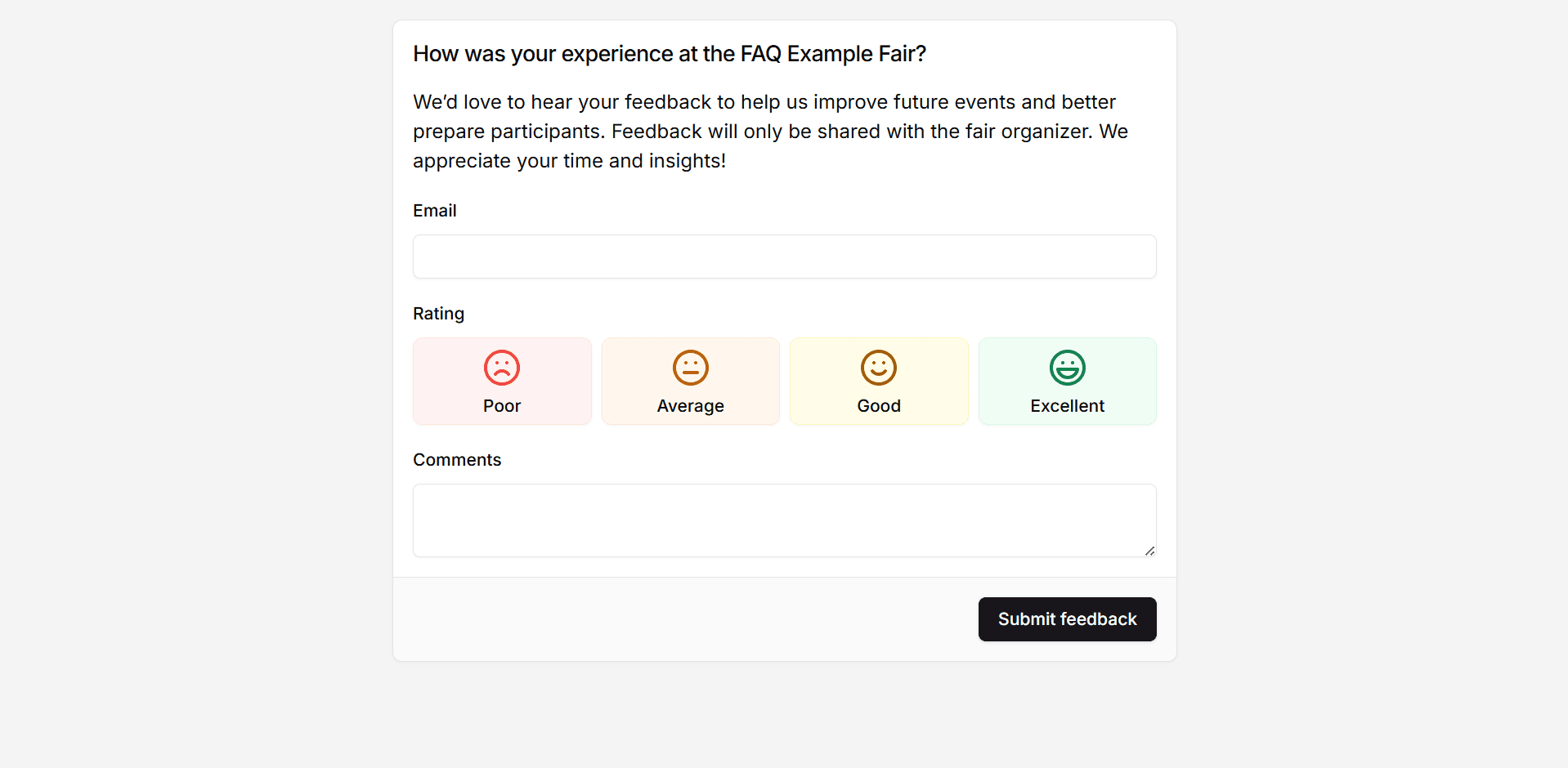
| How was your experience at the fair? | Rating: Poor, Average, Good, Excellent | Employer satisfaction |
| Did you meet qualified candidates? | Yes, Some, No | Employer outcome rate |
| How many strong leads did you meet? | Number | Engagement quality |
| Would you attend again? | Yes, Maybe, No | Retention and referrals |
| Any feedback for the organizer? | Long text, optional | Lessons for the report |
Withe sends booth and participant feedback forms automatically 1 hour after the fair ends, with a one-click rating from Poor to Excellent and an optional comments box already in place.
What should the job seeker feedback form ask?
The job seeker feedback form captures the fair from the candidate's side. The question that matters most is "Did you connect with an employer you're interested in?" Withe's guide singles it out because the answer shows whether the fair delivered value to the people it was built for. The rest of the form records how the day felt and whether the candidate arrived ready.
| Question | Answer format | What it feeds |
|---|---|---|
| How was your experience at the fair? | Rating: Poor, Average, Good, Excellent | Candidate satisfaction |
| Did you connect with an employer you're interested in? | Yes or No | Candidate connection rate |
| How many employers did you speak with? | Number | Engagement |
| Did you feel prepared for the fair? | Yes, Somewhat, No | Prep emails for the next fair |
| What could we improve for next time? | Long text, optional | Lessons for the report |
What should the follow-up survey ask?
The follow-up survey answers what a funder cares about most: whether the fair led to work. Send it to candidates at 30 and 90 days, and repeat the employment status question from the registration form so the two answers can be compared. That comparison turns an attendance list into an outcome. One question to employers about interviews and hires adds their side of the result, and Outcome Metrics covers how these answers become report metrics.
| Question | Answer format | What it feeds |
|---|---|---|
Since the fair, has an employer you met invited you to an interview? | Yes or No | Interview outcomes |
Have you received a job offer from an employer you met at the fair? | Yes or No | Offer outcomes |
| Have you started a new job since the fair? | Yes, with an employer from the fair; Yes, with another employer; No | Hire outcomes |
| What is your current employment status? | Same options as the registration form | Change from the baseline |
For employers: how many candidates from the fair have you interviewed or hired? | Number | Employer-reported outcomes |
Conclusion
Career fair forms are the first draft of the funder report, and each question decides whether that report has evidence or a gap. Before the next fair opens registration, check every question against the report and cut any that will not feed matching, reporting, or follow-up.
Withe Career Fairs connects registration, booth interest, and feedback forms to one post-fair report. Book a demo.
More resources for career fair organizers: